-
Aug 11, 2012, 1:55 pm536 pts OS X Daily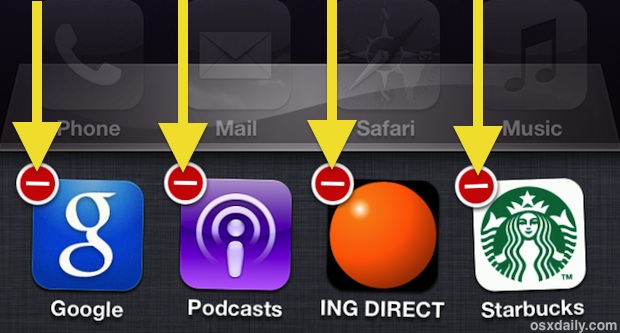
Did you know you can quit multiple running apps at the same time on an iPhone, iPad, or iPod touch? Thanks to multitouch, you can actually quit as many apps as you can get your fingers on (literally). Here’s what to do on any iOS device:
- Double-tap the Home button to summon the task tray, then tap and hold on any icon to make them jiggle
- Use multi-touch to simultaneously tap on the red (-) quit buttons of all apps to quit
You can quit up to 4 apps at a time on an iPhone and iPod touch, and up to 8 apps at a time on an iPad, it’s just a matter of being able to tap all visible red close buttons at the same time.
This is obviously just like the standard method of quitting an app in iOS but multitouch makes closing groups of apps faster than ever.
There isn’t a way to force quit multiple apps though, for that you’ll need to just reboot the device.
Trending Today on MacHash










MacHash is your real-time Apple news aggregator, delivering the latest headlines on Apple, Mac, iPhone, iPad, and iOS from top sources across the web.
As a powerful content discovery platform, MacHash continuously curates breaking news, product announcements, software updates, reviews, and industry insights related to Apple Inc. and its ecosystem.
MacHash helps you stay informed on everything from macOS and iOS developments to Apple Watch, AirPods, and the latest in tech and app innovation.
Access MacHash from your desktop or mobile device to explore, follow, and share the most trusted Apple news all in one place.