Where is the Mac Hash Key
How to use the hash key on macOS
Trying to locate the # hashtag key on your Mac and can't find it? You have come to the right place. Read on for the simple instructions for using and locating the hash key on an Apple keyboard.
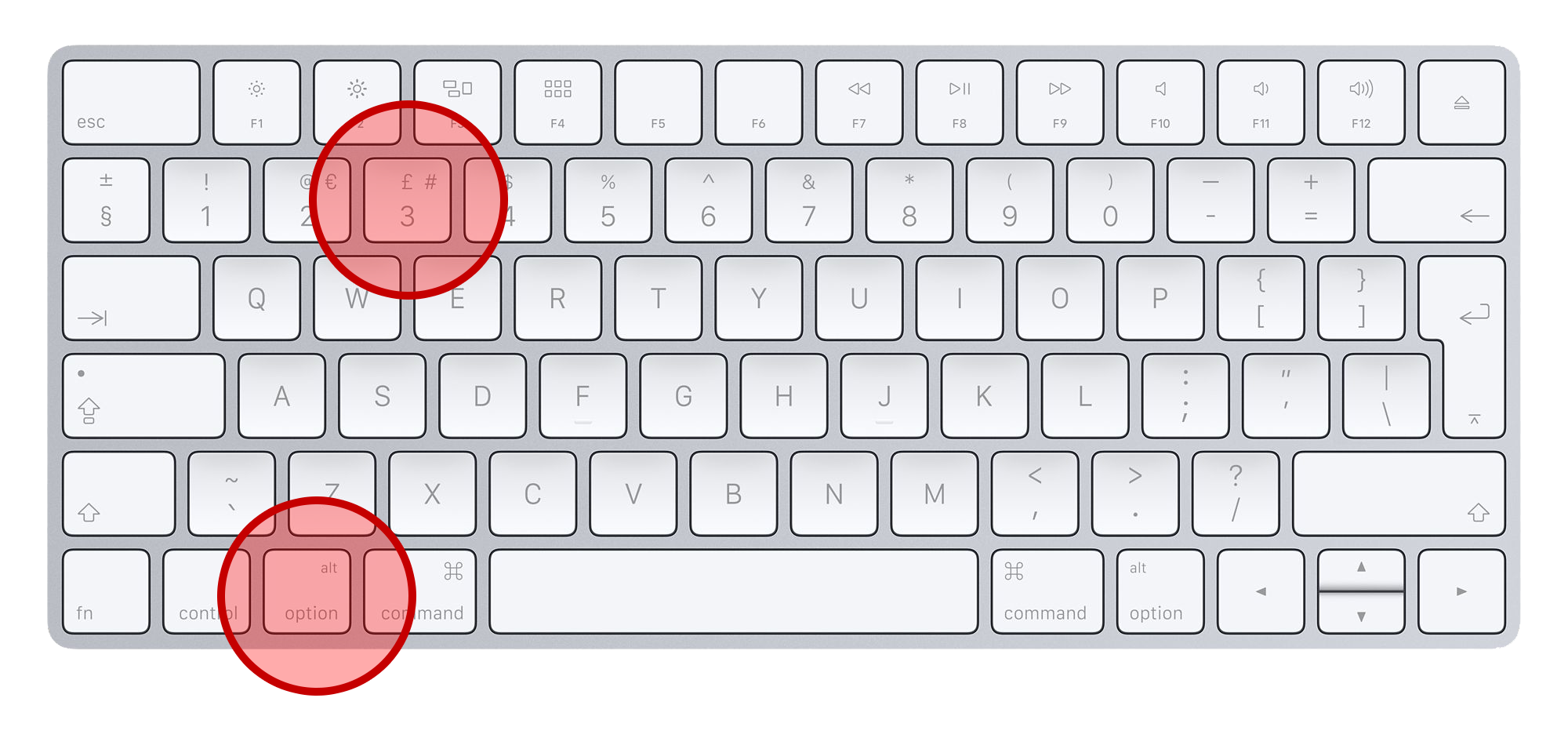 Hold down
option
and press 3
Hash or Pound Key on European Keyboards
The location of the # (hash or pound) key varies significantly between European keyboard layouts, so the shortcut depends on your keyboard's language. On a UK keyboard, simply press the dedicated # key located next to Enter. On a German (QWERTZ) keyboard, type # by pressing AltGr + 3. On a Spanish (Spain) keyboard, use AltGr + 3 as well. For a French (AZERTY) keyboard, press AltGr + 3. On an Italian keyboard, the shortcut is also AltGr + 3, while on many Nordic layouts such as Swedish and Finnish, # is entered with AltGr + 3. If you're using an external keyboard or remote desktop connection, the key combination may differ slightly depending on your operating system and the active keyboard layout, so it's important to verify that the correct language layout is selected in your system settings.
How to Enter the # Symbol on Asian Keyboards
Asian keyboard layouts typically rely on the operating system's input method editor (IME), so the # (hash or pound) symbol is usually entered using the standard keyboard rather than a dedicated language-specific key. On a Japanese (JIS) keyboard, press Shift + 3 to type #. On a Chinese (Simplified or Traditional) keyboard using Microsoft Pinyin, Sogou, or other IMEs with a standard US keyboard, use Shift + 3 as well. Korean (Hangul) keyboards also use Shift + 3 for # on the standard layout. In countries such as India, Singapore, Malaysia, and the Philippines, where English-based keyboard layouts are common, the # symbol is typically entered with Shift + 3. If you're using a localized keyboard or an IME, you may need to temporarily switch to direct English/Latin input mode before typing special symbols like #.
Watch a video on how to find the hash key on a Mac.
The story behind the missing hash symbol, hashtag or number key
The hash key or (also known as the number sign or the sharp or pound sign) is a common symbol, yet a number of international Mac keyboards omit this key. Simply pressing alt and 3 at the same time will insert a # hash symbol into your text in any application. This shortcut will work with all versions of Mac OS X whether you have a Macbook, Air or an iMac.
In most cases Apple has decided to replace this key with a symbol of the local currency. For instance in the UK a £ pound sterling sign is there, in other European countries a € Euro sign has been substituted.
The hash key is most often used to denote numbers or in reference to the telephone keypad. In our modern times the symbol can be found on many street addresses, in many computer programming languages and as a topic "hashtag" tag on Twitter. In engineering circles, the pound sign followed by 'per square inch' is used to describe pounds per square inch. You can read more about the number sign and its history on Wikipedia.
Love Apple? Get the MacHash News iOS App - Free!
 Now that you've found the hash key, now you also know where to find the latest Apple news with the MacHash News app for iPhone & iPad.
MacHash for iOS delivers the latest Apple news from the web's top sites in one app.
Recommended iOS Apps




MacHash is your real-time Apple news aggregator, delivering the latest headlines on Apple, Mac, iPhone, iPad, and iOS from top sources across the web.
As a powerful content discovery platform, MacHash continuously curates breaking news, product announcements, software updates, reviews, and industry insights related to Apple Inc. and its ecosystem.
MacHash helps you stay informed on everything from macOS and iOS developments to Apple Watch, AirPods, and the latest in tech and app innovation.
Access MacHash from your desktop or mobile device to explore, follow, and share the most trusted Apple news all in one place.